
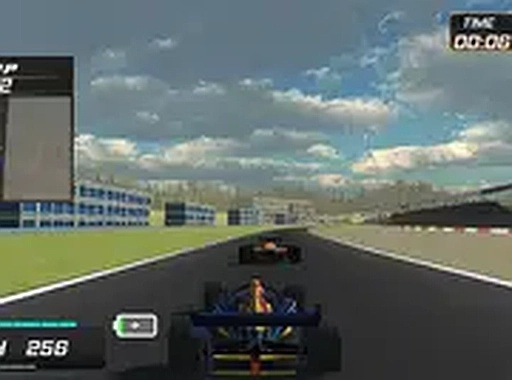
Grand Prix Racing Arcade Challenge
Experience the thrill of Formula One racing in your browser. Compete on multiple tracks, upgrade your car, and unlock new vehicles as you progress.
Reviews
About this game
Game Introduction
Grand Prix Racing Arcade Challenge is a browser-based racing experience that places you in the driver's seat of a high-performance race car. The core objective is to compete in Grand Prix-style races, aiming to finish first on a variety of tracks. What makes this game stand out is its combination of fast-paced arcade racing with a progression system that allows you to upgrade your vehicle and unlock new cars as you win. It is designed for desktop play and offers a full-screen mode for a more immersive experience. The game runs directly in your browser with no download required, making it easy to start playing immediately. Each race tests your ability to navigate tight corners and maintain high speed, rewarding precision and consistency.
How to Play
Players typically start by selecting a track and an initial car. Using keyboard controls, you accelerate, brake, and steer your race car through each course. The goal is to navigate tight corners and maintain high speed to finish in first place. Winning races earns rewards that can be used to improve your car's performance. As you progress, you can unlock additional cars with better stats. The game runs directly in your browser with no download required, and you can switch to full-screen mode for a better view. Practice on each track to learn the best racing lines and improve your lap times.
Game Features
The game includes six distinct tracks, each with its own layout and challenges. You can unlock new race cars as you win races. Performance upgrades are available for engines, tires, and aerodynamics to improve your car's handling and speed. A competitive leaderboard allows you to compare your best lap times with other players. The game supports full-screen mode and is free to play in your browser. These features provide a rewarding progression system that keeps you engaged as you strive to improve your performance and unlock new content.
Tips for Success
To succeed, focus on mastering each track's layout to anticipate turns and braking points. Practice consistently to improve your lap times and learn the best racing lines. Prioritize upgrades that match your driving style, such as better tires for cornering or engine upgrades for straight-line speed. Keep racing to unlock faster cars, and use the leaderboard to track your progress and set new goals.




Comments
0 comments