
Freecell Solitaire Classic Puzzle
Play Freecell Solitaire Classic Puzzle online for free. A relaxing card game where you move all cards to foundation piles using four free cells for storage.
Reviews
About this game
Game Introduction
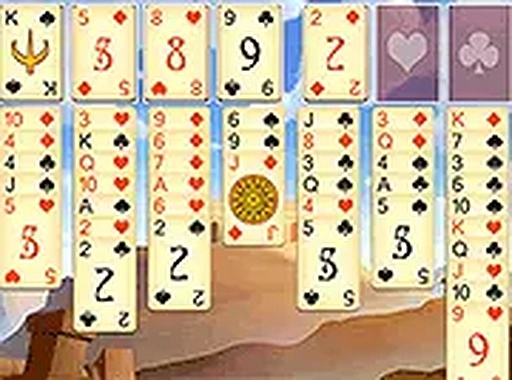
Freecell Solitaire Classic Puzzle is a card game that challenges players to move all 52 cards from a standard deck into four foundation piles. The game features a medieval theme that adds a charming backdrop to the timeless freecell experience. Players use four free cell spots as temporary placeholders to strategically rearrange cards. It offers both classic and simplified card designs for better legibility, making it accessible to players of all skill levels. This free online game runs instantly in your browser without any downloads, providing a relaxing yet engaging challenge for solitaire enthusiasts and newcomers alike.
How to Play
Players begin by examining the tableau of cards dealt on the board. The objective is to move all cards to the four foundation piles at the top, building each pile from Ace to King in the same suit. There are four free cells at the top left that can hold one card each, serving as temporary storage to help rearrange cards. Cards can be moved between tableau columns if they are in descending order and alternating colors. Players click on a card to select it, then click on a destination to move it. Using the free cells wisely is key to freeing up blocked cards and creating sequences. The game ends when all cards are stacked in the foundation piles. Hints and undo moves are available if players get stuck, allowing for a relaxed pace and strategic planning.
Game Features
This free online freecell solitaire offers classic and simplified card designs for improved readability. It includes four free cells for strategic card storage, full screen mode for an immersive experience, and supports both mobile devices and desktop computers. The game requires no download and provides instant play in your browser. The medieval theme adds a charming backdrop to the classic solitaire challenge. Players can enjoy unlimited free play with no time pressure, making it a great choice for anyone looking to pass the time with a thoughtful puzzle.
Tips for Success
To succeed in Freecell Solitaire, plan your moves carefully before acting. Use the four free cells strategically to temporarily store cards that block important sequences. Try to free up tableau columns as early as possible to create more space for rearranging cards. Focus on building foundation piles in order from Ace to King within the same suit. If you get stuck, use the undo feature to backtrack and try a different approach. Practice regularly to improve your strategic thinking and pattern recognition. The key is patience and careful planning, as each move can have a ripple effect on the rest of the game.











Comments
0 comments